Documentation
Community Watch
Anonymous Hyperlocal Reporting for Infrastructure & Neighborhood Needs
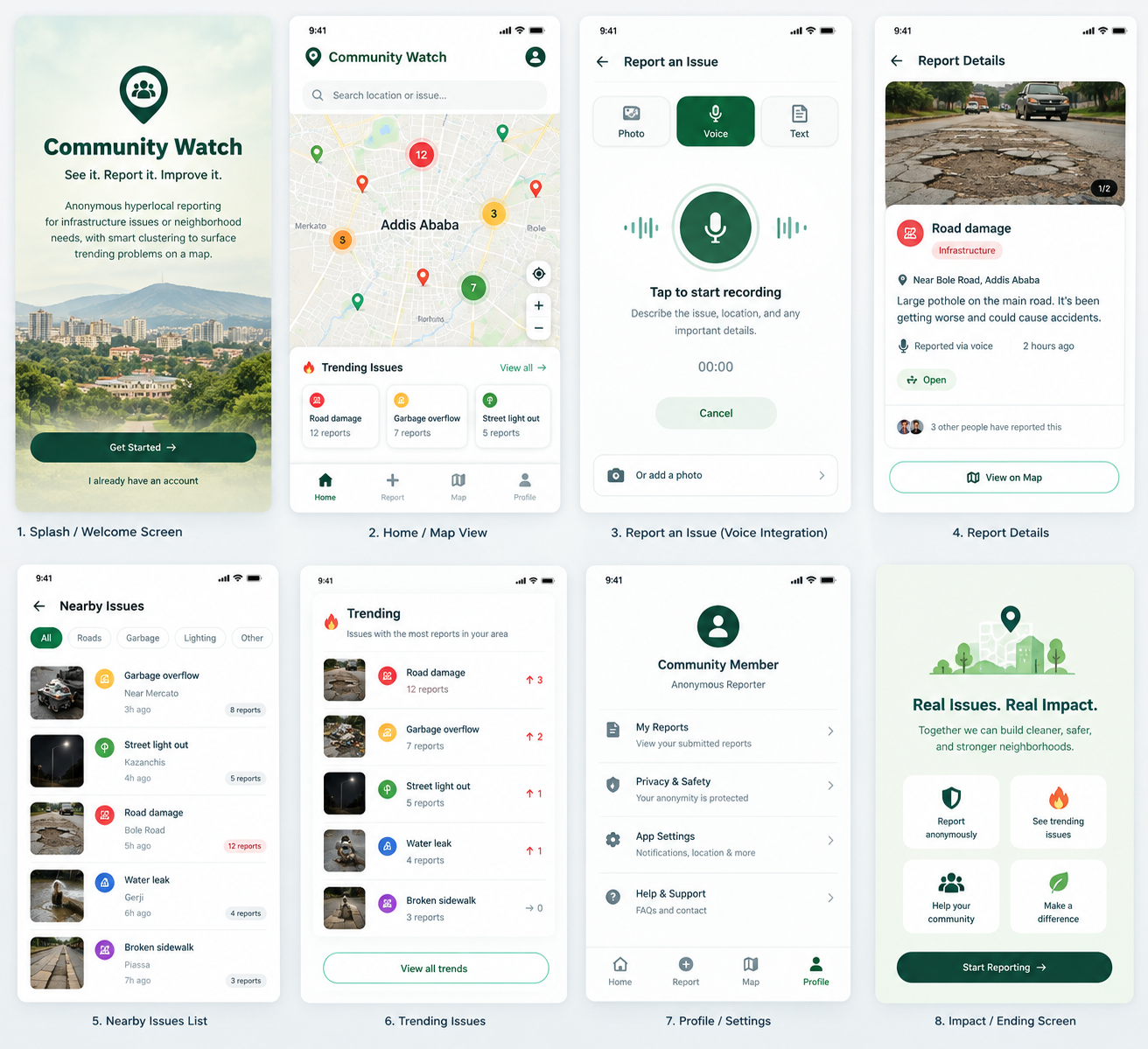
Community Watch is a civic-tech platform that makes it easier for people to report local infrastructure problems and neighborhood needs without exposing their identity.
Residents can submit reports about issues such as damaged roads, broken streetlights, overflowing waste bins, water-related problems, unsafe public spaces, or other community concerns. Reports are displayed on a map and lightweight clustering groups nearby or similar reports to reveal trending problems that may need attention.
The Problem
Many neighborhood problems are noticed by residents but are difficult to communicate, organize, and prioritize. Individual reports can remain scattered across social media, messaging groups, or informal conversations.
Community Watch creates a simple shared layer where residents can:
-
Report problems in their area anonymously
-
Describe what they are experiencing
-
Attach useful evidence such as photos
-
View reported issues on a map
-
See clusters of similar or nearby reports
-
Identify areas where the same problem is being reported repeatedly
Core Features
1. Anonymous Reporting
Users can submit a report without publicly attaching their name or personal profile.
Each report can contain:
-
Issue category
-
Short description
-
Location
-
Optional photo
-
Timestamp
-
Optional voice description
2. Interactive Community Map
Reports appear as locations on an interactive map.
Users can explore issues by area and category, making it easier to understand what is happening around them.
3. Lightweight Issue Clustering
The platform groups reports that are geographically close and/or related to the same type of problem.
Instead of showing dozens of individual reports separately, the system can surface patterns such as:
"Multiple residents are reporting road damage in the same area."
This helps transform individual complaints into visible community-level signals.
4. Trending Problems
Community Watch can calculate simple indicators such as:
-
Number of reports
-
Number of similar reports
-
Geographic concentration
-
Recent reporting activity
These signals help identify issues that are appearing repeatedly or becoming more common.
5. Voice Reporting
Community Watch includes a voice integration feature so users can report an issue by speaking instead of typing.
A user can tap the microphone button and say something like:
"There is a large pothole near the school entrance and cars are struggling to pass."
The voice input can be converted into text and used to help populate the report form.
It also supports Amharic language.
The voice workflow can support:
-
Record voice
-
Convert speech to text
-
Extract or suggest the issue description
-
Let the user review and edit the result
-
Submit the report
